


I built a tool called Article Forge that publishes my articles across Medium, dev.to, Substack, and my own blog at drippery.app. Last week, I added a feature that generates SEO metadata for every blog post before it hits the Drippery Blog admin API.
Six fields. Strict JSON shape. No prose, no markdown fences, no creative liberties. That is the requirement. Sounds simple until you actually try it.
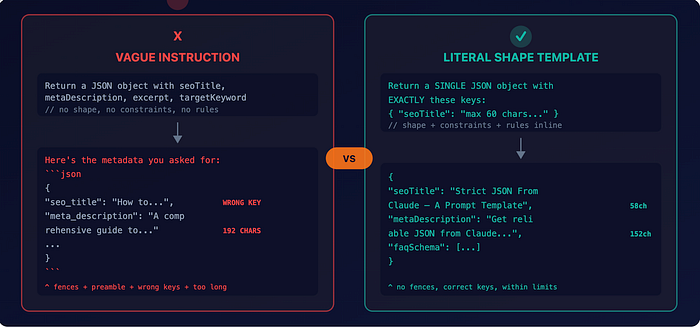
When you ask Claude (or any LLM) for a specific JSON shape, the failure mode is not a crash. It is a subtle drift. The model wraps its answer in JSON fences. Or it adds a friendly preamble. Or it renames seoTitle to seo_title halfway through your test suite.
Each response looks fine in isolation. The bug only shows up at scale.
After a couple of iterations, I landed on a system prompt that hits zero drift across the first 30 articles I ran it on. Sharing the full template plus the defensive parser that hardens it.
The system prompt
const SEO_METADATA_SYSTEM_PROMPT = `You are an SEO copywriter
producing search-optimized metadata for a developer/SaaS-focused
blog post.
You will be given the article title and full body.
Return a SINGLE JSON object (no prose, no markdown fences)
with EXACTLY these keys:
{
  "seoTitle": "string, max 60 chars, includes the primary
               keyword near the front",
  "metaDescription": "string, 140-160 chars, action-oriented,
                      includes the primary keyword once",
  "excerpt": "string, 200-300 chars, plain prose summary;
              no markdown",
  "targetKeyword": "string, the single primary search phrase
                    you optimized for (lowercase, 2-5 words)",
  "faqSchema": [
    { "question": "string",
      "answer": "string, 1-3 sentences, answers the question
                 concretely" }
  ]
}
Rules:
- faqSchema must contain 3 to 5 question/answer pairs derived
  from the article.
- Never invent facts the article does not actually contain.
- seoTitle and metaDescription length limits are HARD.
  Count characters carefully.
- Output ONLY the JSON object. No json fences, no commentary,
  no leading/trailing text.`;
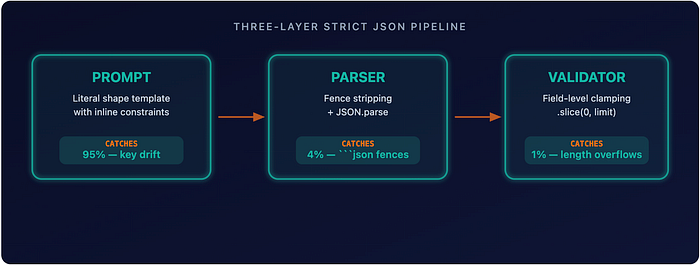
Three design decisions are doing the heavy lifting here.
- The shape is shown literally, with the type and constraint inline next to each key. Not a vague instruction like "return a JSON object with seoTitle, metaDescription" but the actual object, with the rules embedded in the value strings. Claude treats this as a fill-in-the-blank exercise rather than a creative writing brief.
- "Output ONLY the JSON object" is the last line. Last-line instructions land harder than mid-prompt ones in my experience. The model keeps the final instruction in attention while generating. Put your strictest constraint at the end, not the beginning.
- "No JSON fences" is called out explicitly. Without this, Claude wraps the response in fences roughly a third of the time on a "give me JSON" prompt. One explicit sentence kills the behavior.
The defensive parser
Even with a perfect prompt, you are one hot lunch away from the model adding fences anyway. LLMs are probabilistic. A prompt that works 100 times will fail on attempt 101. So the parser strips fences before JSON.parse:
const stripped = text
  .trim()
  .replace(/^```(?:json)?\s*/i, "")
  .replace(/\s*```$/i, "")
  .trim();

let parsed: unknown;
try {
  parsed = JSON.parse(stripped);
} catch (err) {
  throw new Error(
    `generateSeoMetadata: model returned non-JSON output: ` +
    `${err.message}\n---\n${text.slice(0, 500)}`
  );
}
Two regex replaces. That is the entire safety net. The error message includes the first 500 chars of the raw response, so debugging is fast. You do not have to re-run the call to see what came back.
The key insight: do not argue with the model. Defend against it. The prompt says "no fences." The parser strips fences anyway—belt-and-suspenders.
Validation, not trust
The next layer is field-level validation. The model occasionally produces an SEO title of 67 characters when I told it 60. Do not negotiate with the model. Clamp the output:
return {
  seoTitle: seoTitle.slice(0, 60),
  metaDescription: metaDescription.slice(0, 160),
  excerpt: excerpt.slice(0, 500),
  targetKeyword: targetKeyword.slice(0, 100),
  faqSchema,
};
The Drippery Blog admin API has hard varchar limits on these columns. If the model overshoots and I forward the raw value, the DB rejects the insert, and the user sees a 500.
With a .slice(), the worst case is a slightly truncated SEO title, which is still publishable. I will take that over a broken publish flow every time.
Why not tool-use mode?
Claude has a built-in tool-use feature that enforces JSON shape via a schema definition. I considered it and rejected it for this use case.
Tool-use adds API complexity: you define a tool schema, the model "calls" the tool, and you extract the arguments. It is the right hammer when the LLM needs to decide between multiple tools, or when you are chaining calls.
For "give me one structured object, it is overengineering. My prompt + parse approach was three times less code. The entire pipeline fits in one file, under 60 lines. Zero external dependencies beyond the Anthropic SDK.
What this unlocked
This pipeline now runs on every article I publish to drippery.app/blog.
30+ articles processed. Zero manual SEO work. Zero drift failures.
Before this, I would either skip SEO metadata entirely (bad for organic traffic) or spend 10 minutes hand-writing titles and descriptions for each post. Now the pipeline generates metadata in under 3 seconds.
The field-level clamping means the output always fits the database schema on the first try.
The reusable template
If you are starting from scratch, here is the shape that has been working for me:
You are a [role]. Return a SINGLE JSON object (no prose, no markdown fences)
with EXACTLY these keys: show the literal object with type+constraint per value.
Rules: list hard constraints. Output ONLY the JSON object. No json fences,
no commentary, no leading/trailing text.
Pair it with the two-replace fence stripper and a per-field clamp.
Four lines of prompt discipline beat four pages of post-hoc parsing.