

⚠️ Note, the instructions below are for MacOS. You should be able to replace the workspace path with the equivalent on your platform.
Step 1. Identify the Connection Name
First, you'll need to find out the internal name of the saved connection.
Navigate to your workspace folder.
ℹ️ On MacOS, it's ~/Library/DBeaverData/workspace6/General/.dbeaver
Open the file: data-sources.json
The database connection we are looking for is named "Development Database"
In the data sources file, we can see that the internal name for this connection is yandex_clickhouse-518accb622c330–2622869e2d1e85b5dd4
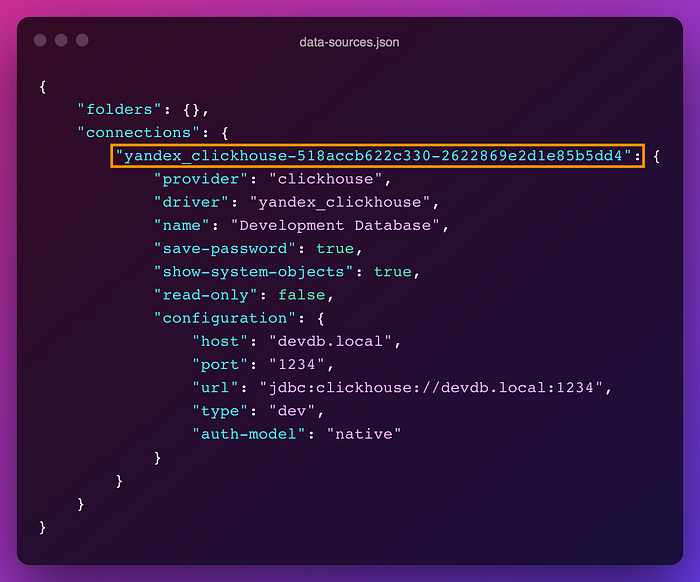
We need to remember that.
Step 2. Decrypt Saved Passwords
In a terminal window, run the following command:
(You might need to replace the workspace path with one appropriate for your platform)
openssl aes-128-cbc -d -K babb4a9f774ab853c96c2d653dfe544a -iv 00000000000000000000000000000000 -in "${HOME}/Library/DBeaverData/workspace6/General/.dbeaver/credentials-config.json" | dd bs=1 skip=16 2>/dev/nullYou should see something like the below:
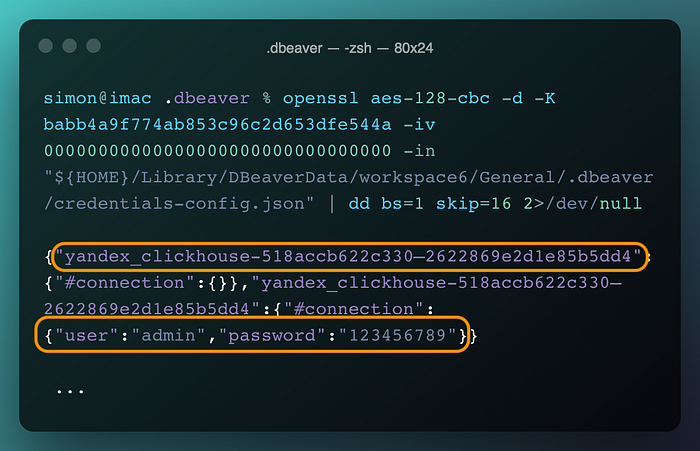
All connection passwords will be displayed in the terminal window, and you can identify the one you're looking for from the connection name you would have collected from step 1.
That's it! Hope this helps.